Introduction
Cloud computing has become one of the most influential technologies in the modern digital world. It has changed the way individuals, businesses, and organizations store information, run applications, and manage computing resources. Instead of relying on traditional physical servers and personal computer systems, cloud computing allows users to access technology services through the internet.
With cloud computing, organizations can use services such as data storage, software applications, databases, networking, and processing power without purchasing expensive hardware. This approach provides flexibility, scalability, and efficiency, making cloud computing an essential part of digital transformation.
Many businesses around the world are adopting cloud solutions to improve productivity, reduce costs, and create innovative services. However, despite its many benefits, cloud computing also has some disadvantages, including security concerns, dependency on internet connectivity, and possible challenges in managing cloud systems.
Understanding both the advantages and disadvantages of cloud computing helps organizations make better decisions about adopting this technology.
What is Cloud Computing?
Cloud computing is the delivery of computing services through the internet. These services include servers, storage, databases, networking, software, and analytics. Instead of owning and maintaining physical infrastructure, users can access resources from cloud providers whenever needed.
Cloud computing operates through large data centers managed by cloud service providers. These providers maintain the hardware, software, and security systems required to deliver reliable services.
The main cloud service models include:
- Infrastructure as a Service (IaaS): Provides virtual servers, storage, and networking resources.
- Platform as a Service (PaaS): Provides development environments for creating applications.
- Software as a Service (SaaS): Provides ready-to-use software applications through the internet.
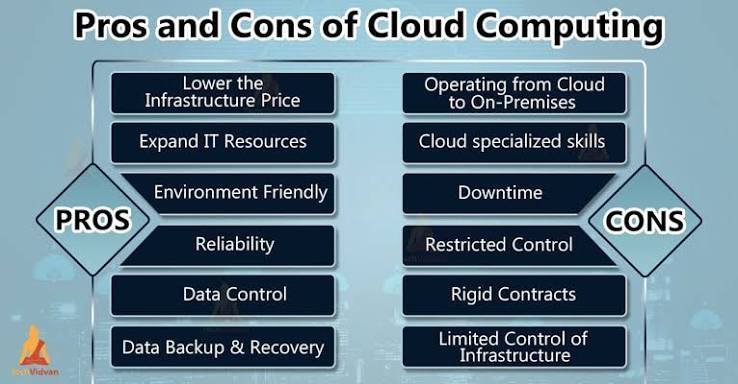
Advantages of Cloud Computing
1. Cost Savings
One of the biggest advantages of cloud computing is cost reduction. Traditional IT systems require organizations to purchase expensive servers, storage devices, and software licenses. They also need to spend money on maintenance and technical support.
Cloud computing removes the need for large investments in physical infrastructure. Businesses can use cloud resources on a pay-as-you-go basis, meaning they only pay for the services they actually use.
This cost-effective approach is especially beneficial for small businesses and startups that may not have large technology budgets.
2. Scalability and Flexibility
Cloud computing provides excellent scalability, allowing organizations to increase or decrease resources according to their requirements.
For example, an online business may experience high traffic during special events or sales periods. Cloud services allow the company to quickly increase computing power and storage capacity without purchasing additional hardware.
This flexibility helps businesses respond quickly to changing market conditions and customer demands.
3. Accessibility and Remote Work Support
Cloud computing allows users to access data, applications, and services from anywhere with an internet connection. This feature has become extremely valuable with the growth of remote work.
Employees can work from different locations while accessing the same files and business systems. Cloud-based collaboration tools also allow teams to communicate and work together in real time.
This improves productivity and creates more flexible working environments.
4. Data Backup and Recovery
Protecting important information is a major concern for organizations. Cloud computing provides reliable backup and recovery solutions that help prevent data loss.
If a system failure, cyberattack, or natural disaster occurs, businesses can restore their information from cloud backups. This improves business continuity and reduces downtime.
5. Improved Collaboration
Cloud computing makes collaboration easier by allowing multiple users to access and edit files simultaneously. Teams can share documents, manage projects, and communicate through cloud-based platforms.
This is especially useful for organizations with employees working in different locations.
6. Automatic Updates and Maintenance
Cloud service providers manage software updates, hardware maintenance, and system improvements. Organizations do not need to manually install updates or manage complex technical tasks.
Automatic maintenance saves time and allows businesses to focus on their main activities.
7. Enhanced Security Features
Many cloud providers invest heavily in cybersecurity technologies to protect user information. They use methods such as:
- Data encryption
- Identity management
- Access controls
- Security monitoring
- Threat detection systems
These security measures help reduce risks and protect sensitive information.
8. Faster Deployment
Cloud computing allows businesses to quickly launch applications and services. Instead of spending weeks or months setting up physical infrastructure, organizations can create cloud environments within a short time.
This faster deployment supports innovation and helps businesses introduce new products more quickly.
Disadvantages of Cloud Computing
1. Security and Privacy Concerns
Although cloud providers offer advanced security features, storing data on external servers creates privacy concerns. Organizations may worry about unauthorized access, data breaches, or cyberattacks.
Businesses must carefully select cloud providers and implement additional security measures to protect sensitive information.
2. Dependence on Internet Connectivity
Cloud computing requires a reliable internet connection. If the internet service is unavailable or unstable, users may not be able to access cloud applications and data.
For organizations that depend heavily on cloud systems, internet downtime can affect productivity and business operations.
3. Limited Control Over Infrastructure
When using cloud services, organizations do not have complete control over the physical infrastructure. Cloud providers manage servers, hardware, and certain security processes.
Some businesses may find this lack of control challenging, especially those with strict technical requirements.
4. Cloud Service Downtime
Although cloud providers aim to maintain high availability, service interruptions can still occur. Technical problems, maintenance activities, or unexpected failures may temporarily affect access to cloud services.
Businesses should have backup plans to reduce the impact of possible downtime.
5. Data Migration Challenges
Moving existing data and applications to the cloud can be complex. Organizations may face difficulties transferring large amounts of data, ensuring compatibility, and avoiding disruption during migration.
Proper planning and technical expertise are required for successful cloud migration.
6. Vendor Lock-In
Vendor lock-in occurs when an organization becomes heavily dependent on one cloud provider. Moving applications and data from one provider to another may become difficult and expensive.
Businesses should carefully evaluate cloud providers and consider flexible solutions to reduce dependency risks.
7. Technical Skills Requirement
Although cloud services simplify many IT tasks, organizations still need skilled professionals to manage cloud environments effectively.
Employees may require training in areas such as cloud security, resource management, and system configuration.
8. Unexpected Costs
While cloud computing can reduce expenses, poor management can lead to unexpected costs. Organizations may spend more than expected if they do not monitor resource usage carefully.
Proper planning and cost management strategies are necessary to control cloud expenses.
Balancing the Benefits and Challenges
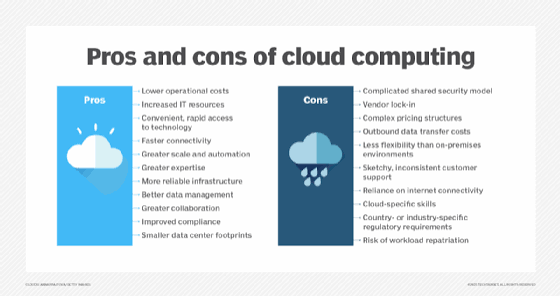
The decision to adopt cloud computing depends on an organization’s specific needs and goals. While cloud technology offers many advantages, businesses must also address potential risks.
Organizations can maximize the benefits of cloud computing by:
- Choosing reliable cloud providers
- Implementing strong security policies
- Training employees
- Monitoring cloud usage
- Creating backup and recovery plans
A balanced approach helps organizations use cloud technology effectively while reducing possible disadvantages.
Future of Cloud Computing
The future of cloud computing looks promising as new technologies continue to develop. Artificial intelligence, automation, edge computing, and advanced security systems will make cloud platforms more powerful and reliable.
Future cloud solutions will provide better performance, stronger protection, and more intelligent services. Organizations will continue adopting cloud technology to improve efficiency and create innovative digital solutions.
Conclusion
Cloud computing has transformed the way organizations use technology by providing flexible, affordable, and powerful computing solutions. Its advantages, including cost savings, scalability, accessibility, collaboration, and improved efficiency, have made it an essential technology for modern businesses.
However, cloud computing also has challenges such as security concerns, internet dependency, limited control, and migration difficulties. Organizations must carefully plan their cloud strategies and implement proper security practices to overcome these challenges.
Overall, the advantages of cloud computing often outweigh its disadvantages when implemented correctly. As technology continues to evolve, cloud computing will remain a key driver of innovation, digital transformation, and business growth in the future.