Introduction
Cloud computing has become a major part of modern technology, changing how individuals and organizations access and use digital resources. Instead of purchasing expensive hardware, installing complex software, and managing physical servers, users can now access computing services through the internet. This shift has allowed businesses to become more flexible, reduce costs, and quickly adapt to changing technology requirements.
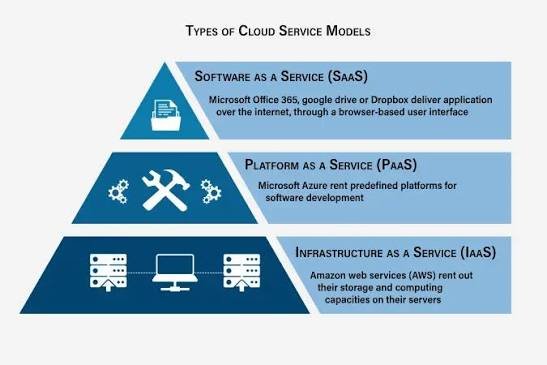
Cloud computing services are generally divided into three main categories: Infrastructure as a Service (IaaS), Platform as a Service (PaaS), and Software as a Service (SaaS). These three service models represent different levels of cloud solutions, from basic computing infrastructure to complete software applications.
Understanding these models is important because each one provides different benefits and is designed for different types of users. Businesses, developers, and individuals can choose the most suitable cloud service depending on their technical needs, budget, and goals.
Understanding Cloud Computing Service Models
Cloud computing service models describe how cloud resources are delivered to users. Instead of owning and managing all technology components themselves, organizations can use cloud providers that handle infrastructure, software, and maintenance.
The three primary cloud service models are:
- Infrastructure as a Service (IaaS) – Provides basic computing infrastructure.
- Platform as a Service (PaaS) – Provides tools and environments for application development.
- Software as a Service (SaaS) – Provides ready-to-use software applications.
These models are often represented as layers, where IaaS forms the foundation, PaaS builds on top of that foundation, and SaaS provides complete applications for end users.
Infrastructure as a Service (IaaS)
What is IaaS?
Infrastructure as a Service (IaaS) is the most basic level of cloud computing services. It provides virtualized computing resources such as servers, storage, and networking through the internet.
With IaaS, organizations do not need to purchase and maintain physical hardware. Instead, they rent infrastructure from cloud providers and use it according to their requirements.
IaaS gives businesses control over their operating systems, applications, and data while the cloud provider manages the physical infrastructure.
How IaaS Works
In an IaaS environment, cloud providers maintain large data centers containing physical servers, storage systems, and networking equipment. These resources are divided into virtual machines that customers can access remotely.
Users can create, configure, and manage virtual servers based on their needs. They can install operating systems, software applications, and security tools just like they would on traditional servers.
Key Features of IaaS
Virtual Servers
IaaS provides virtual machines that allow organizations to run applications without owning physical servers.
Scalable Resources
Businesses can increase or decrease computing resources depending on demand. This makes IaaS suitable for organizations with changing workloads.
Flexible Storage
IaaS provides different storage options for managing files, databases, and backup information.
Network Management
Users can configure virtual networks, security settings, and connections according to their requirements.
Advantages of IaaS
Cost Savings
IaaS reduces the need for expensive hardware investments. Businesses only pay for the resources they use.
Greater Control
Organizations have more control over their operating systems, applications, and configurations.
Easy Expansion
Companies can quickly increase computing resources when their business grows.
Disaster Recovery
IaaS provides reliable backup and recovery options that help protect business information.
Common Uses of IaaS
IaaS is commonly used for:
- Website hosting
- Application testing and development
- Data backup
- High-performance computing
- Business applications
- Virtual data centers
Large organizations and technology companies often use IaaS because it provides flexibility and control.
Platform as a Service (PaaS)
What is PaaS?
Platform as a Service (PaaS) is a cloud service model that provides a complete development environment for creating, testing, and deploying applications.
Unlike IaaS, where users manage operating systems and infrastructure, PaaS provides a ready-made platform where developers can focus mainly on writing and improving applications.
PaaS removes the complexity of managing hardware, software updates, and system maintenance, allowing developers to work more efficiently.
How PaaS Works
PaaS providers manage the underlying infrastructure, including servers, storage, networks, operating systems, and development tools. Developers access the platform through the internet and use built-in tools to create applications.
The platform supports different programming languages, databases, testing tools, and deployment services.
Key Features of PaaS
Development Tools
PaaS provides tools that help developers write, test, and manage applications.
Database Management
Many PaaS platforms include database services that make storing and managing information easier.
Application Deployment
Developers can quickly deploy applications without configuring complex infrastructure.
Collaboration Support
PaaS allows development teams to work together more effectively by providing shared environments.
Advantages of PaaS
Faster Application Development
Developers can create applications faster because they do not need to manage infrastructure.
Reduced Complexity
PaaS handles technical tasks such as software updates and server management.
Cost Efficiency
Organizations save money by avoiding the need to build and maintain development environments.
Supports Innovation
Developers can experiment with new ideas and technologies more easily.
Common Uses of PaaS
PaaS is commonly used for:
- Web application development
- Mobile application development
- API development
- Software testing
- Database applications
Technology companies and software developers often use PaaS to speed up the development process.
Software as a Service (SaaS)
What is SaaS?
Software as a Service (SaaS) is the most common and widely used cloud service model. It provides complete software applications through the internet.
With SaaS, users do not need to install or maintain software on their computers. They simply access applications through a web browser or mobile application.
The cloud provider manages everything, including servers, updates, security, and maintenance.
How SaaS Works
SaaS applications are hosted on cloud servers and delivered to users through the internet. Users usually access these services through subscription-based plans.
The provider is responsible for maintaining the application, ensuring availability, and managing technical updates.
Key Features of SaaS
Easy Accessibility
Users can access SaaS applications from any device with an internet connection.
Automatic Updates
Software updates are managed automatically by the service provider.
Subscription-Based Pricing
Users usually pay monthly or yearly fees instead of purchasing expensive software licenses.
Multi-User Support
Many SaaS applications allow multiple users to collaborate and share information.
Advantages of SaaS
Convenience
Users can start using applications immediately without installation.
Lower Costs
Businesses avoid large software purchase costs and maintenance expenses.
Automatic Maintenance
Providers handle updates, security improvements, and technical issues.
Remote Access
Employees can access business applications from different locations.
Common Uses of SaaS
SaaS applications are used for:
- Email services
- Online document editing
- Customer relationship management
- Project management
- Video communication
- Accounting software
SaaS is popular among businesses and individuals because it is simple, affordable, and easy to use.
Comparison Between IaaS, PaaS, and SaaS
| Feature | IaaS | PaaS | SaaS |
|---|---|---|---|
| Purpose | Provides infrastructure | Provides development platform | Provides software applications |
| Users | IT professionals and system administrators | Developers | General users and businesses |
| Control Level | Highest | Medium | Lowest |
| Management Responsibility | User manages applications and systems | User manages applications | Provider manages everything |
| Flexibility | Very high | High | Limited |
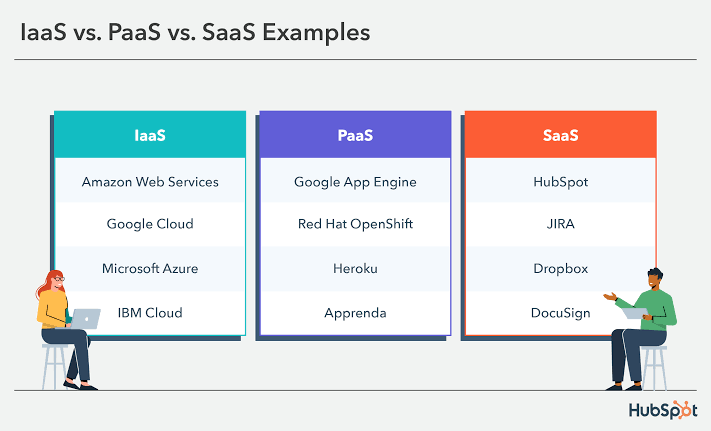
| Examples | Virtual servers and storage | Application development platforms | Online software applications |
Choosing the Right Cloud Service Model
Choosing between IaaS, PaaS, and SaaS depends on an organization’s needs.
Businesses that need complete control over their infrastructure may choose IaaS. Companies focused on application development often prefer PaaS because it simplifies the development process. Organizations that need ready-to-use software solutions usually select SaaS.
Many businesses use a combination of all three models to meet different requirements.
Future of Cloud Service Models
Cloud service models will continue to evolve as technology advances. Artificial intelligence, automation, edge computing, and advanced analytics will improve cloud platforms and create new possibilities.
Future cloud services will become more intelligent, secure, and easier to use. Businesses will increasingly combine IaaS, PaaS, and SaaS solutions to build flexible digital environments.
As cloud adoption continues to grow, these service models will remain essential for supporting innovation and digital transformation.
Conclusion
IaaS, PaaS, and SaaS are the three main service models that form the foundation of cloud computing. Each model provides different levels of control, flexibility, and convenience.
IaaS offers powerful infrastructure resources, PaaS provides development environments for creating applications, and SaaS delivers complete software solutions to users. Together, these models allow organizations to use technology more efficiently and focus on innovation rather than managing complex IT systems.
As businesses continue moving toward digital solutions, cloud computing services will play an increasingly important role in improving productivity, reducing costs, and creating new opportunities in the modern technological world.